Guide for Communities
Communities in the Data Catch-all Repository
Most users do not need a dedicated community. They can create and manage records as individual submitters using the repository’s standard submission workflow.
A dedicated community can be established for a group, project, organisation, or research team that wants to organise related records and manage repository access through shared roles and permissions.
Communities are particularly suitable for groups that need a common submission environment but do not require a separate specialised repository.
When to Use a Community
A community may be useful when:
- several users contribute records as part of the same project or organisation;
- records should be grouped under a shared community;
- designated users need to curate or manage submitted records;
- membership and repository roles need to be managed for a defined group of users;
- the group needs a shared submission and curation process.
A dedicated community is not necessary when a user only needs to create and publish their own records using the standard repository workflow.
Community Records and Permissions
When creating a record, the submitter selects the community to which the record should be submitted.
The records and actions available within a community depend on the role assigned to the user. Community membership does not automatically grant all available permissions.
For information about record visibility and publication states, see Record Life Cycle and Visibility.
Metadata and Submission Workflow
Communities in the Data Catch-all Repository use the same core record form and metadata model as the rest of the repository.
Records use the Czech Core Metadata Model and are created using the sections described in Creating Records in the Data Catch-all Repository.
Communities may use different combinations of roles and permissions, but the Data Catch-all Repository is not intended to provide completely separate metadata models or highly customised repository functionality for individual communities.
Groups that require a dedicated metadata model, specialised curation tools, or substantially different repository behaviour may need a dedicated repository instead.
Establishing a Community
To request a new community, contact the repository support team at datarepo@eosc.cz.
When submitting the request, provide the following information where possible:
- the proposed name of the community;
- the organisation, project, or group represented by the community;
- the purpose of the community;
- the expected number of users and records;
- the person who will act as the initial Community owner;
- any expected curation or publication requirements.
The support team will assess the request and provide instructions for setting up the community and assigning the appropriate roles.
Community Membership
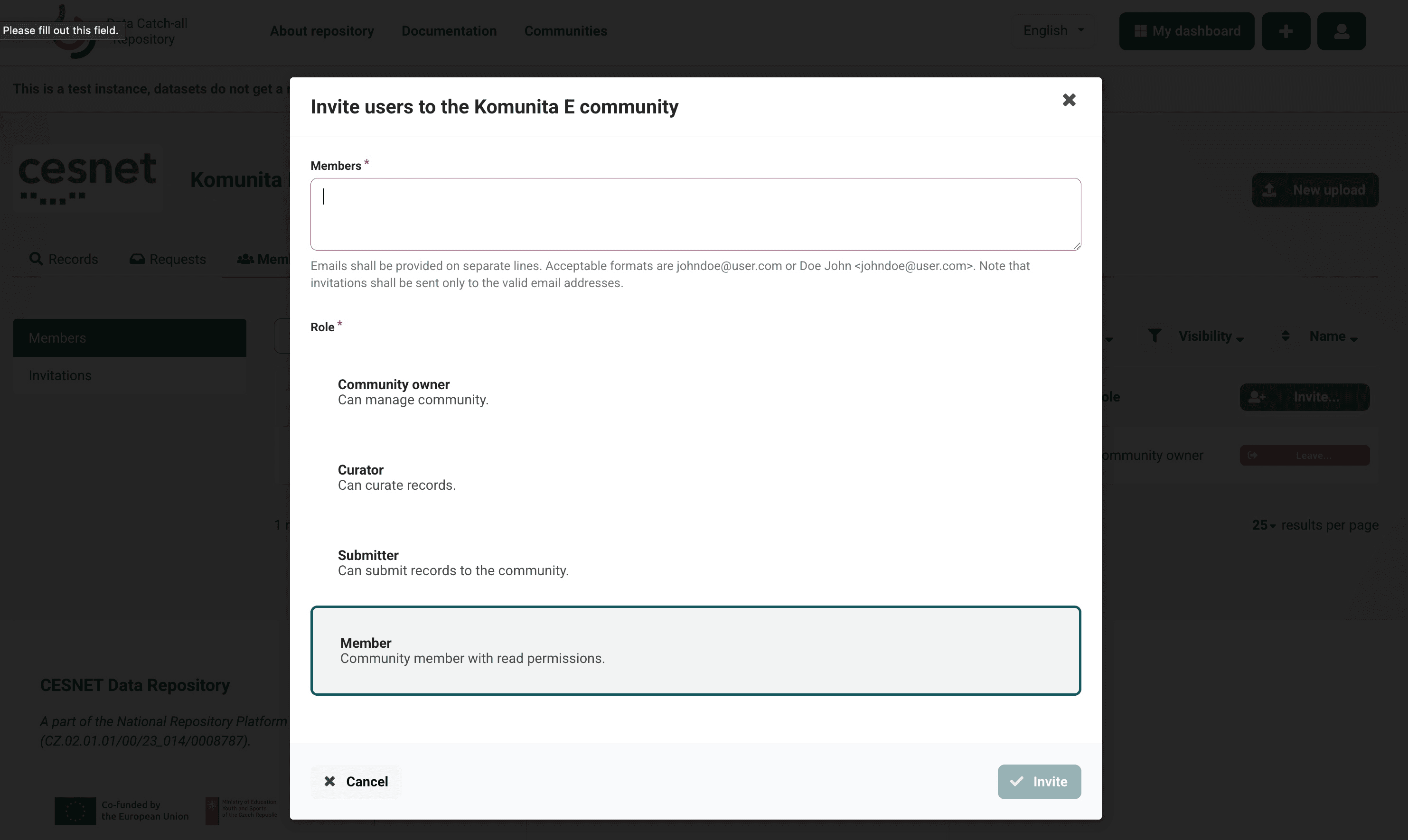
Users with permission to manage the community can invite one or more users and assign a community role to them.
To invite users:
- Enter their email addresses in the Members field. Enter each address on a separate line.
- Select the role that should be assigned to the invited users.
- Select Invite.
Email addresses can be entered either as plain addresses, for example
johndoe@user.com, or together with a name, for example
Doe, John <johndoe@user.com>.
All users included in the same invitation are assigned the selected role.
Users who want to join an existing community should contact a Community owner. If you do not know who the Community owner is, contact the repository support team at datarepo@eosc.cz.
For general registration instructions, see Getting Access to the Data Catch-all Repository
Community Roles
Each community member is assigned one of the following roles.
Community Owner
A Community owner can manage the community.
Curator
A Curator can curate records submitted to the community.
Submitter
A Submitter can submit records to the community.
Member
A Member has read permissions within the community.
The assigned role determines which community records and actions are available to the user.
Community Management
Community owners can manage the community, including inviting users and assigning roles.
Changes to the community configuration that are not available through the repository interface must be requested from the repository support team at datarepo@eosc.cz.